
LTK Manager League of Legends Mod Manager
LTK Manager is a powerful and easy-to-use mod manager for League of Legends. It helps you install, organize, and manage custom skins, maps, HUDs, audio, and other game modifications in one place. With a user-friendly interface, multiple mod profiles, and convenient management tools, LTK Manager makes customizing your League of Legends experience simple and organized.
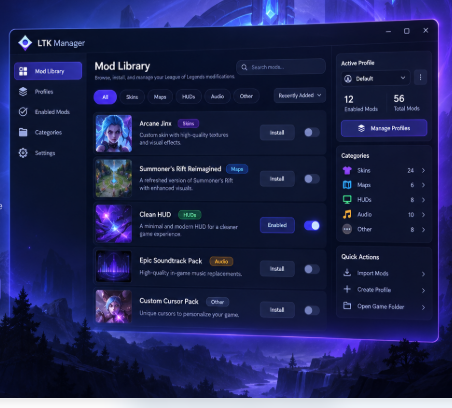
What Is LTK Manager?
LTK Manager is a desktop mod management application designed for League of Legends players who want more control over their game modifications. It provides a convenient way to install, organize, enable, and manage custom skins, maps, HUDs, audio files, and other supported modifications through a single interface.
Developed as part of the League Toolkit ecosystem, LTK Manager simplifies mod management by bringing essential tools together in one application. Instead of handling modification files manually, players can import compatible packages, explore their mod library, and choose which modifications they want to activate.
The application also supports multiple mod profiles, allowing users to create different combinations of enabled mods and switch between them when needed. With its organized library, built-in management features, and straightforward workflow, LTK Manager makes it easier to customize and maintain a personalized League of Legends experience.
Key Features of LTK Manager
LTK Manager provides essential tools for installing, organizing, and managing League of Legends mods. Explore its key features for easier game customization.
Easy Mod Installation
LTK Manager makes installing League of Legends mods simple. Import compatible .fantome, .modpkg, and .zip files directly into your library without manually managing game files.
Custom Skins and Visual Mods
Customize League of Legends with supported champion skins, map textures, HUDs, and visual modifications. Manage your preferred designs and personalize the game's appearance.
Organized Mod Library
Keep all your League of Legends mods organized in one place. Browse installed modifications, manage their status, and quickly find the content you need.
Multiple Mod Profiles
Create and manage different mod configurations. Switch between profiles, organize enabled mods, and maintain separate setups for your favorite customizations.
Built-in Mod Workshop
Explore mod creation and editing tools with the integrated Workshop. Create, modify, and package compatible League of Legends modifications.
Mod Health and Diagnostics
Identify potential mod issues using built-in diagnostic tools. Check supported modifications, troubleshoot problems, and maintain your mod collection more efficiently.
How Does LTK Manager Work?
LTK Manager makes customizing League of Legends easier with a simple mod management process. Follow these steps to import, organize, enable, and use your favorite game modifications.
Launch LTK Manager
Open LTK Manager on your Windows computer. The application detects your League of Legends installation or allows you to select the game directory manually.
Import Custom Mods
Import compatible custom skins, maps, HUDs, and audio modifications into your mod library using supported file formats.
Organize Your Mod Library
Browse your imported modifications in one place. Keep your mod collection organized and quickly find the content you want to use.
Enable Your Favorite Mods
Select your preferred modifications and create different mod profiles to manage separate customization setups.
Run the Mod Patcher
Start the mod patcher to prepare your enabled modifications for League of Legends. Follow the instructions shown in the application.
Launch League of Legends
Open League of Legends with your selected modifications prepared. Return to LTK Manager whenever you want to update your mod configuration.
How to Use LTK Manager
Learn how to use LTK Manager to customize League of Legends. From importing compatible mod files to managing your collection, these instructions help you get started.
Manage Your League of Legends Mods with Ease
LTK Manager provides a convenient workspace for managing custom game modifications. Use its mod library and profile tools to organize your preferred skins, maps, HUDs, and audio packages without manually handling every modification.
Import Your Mod Files
Open the mod library and import compatible .fantome, .modpkg, or .zip packages containing your preferred League of Legends modifications.
Select Your Preferred Mods
Browse imported modifications and enable the skins, maps, HUDs, or audio packages you want to use.
Manage Mod Profiles
Create and switch between profiles to organize different combinations of enabled modifications.
Apply and Update Mods
Use the mod patcher to prepare enabled modifications. Update your selection whenever you want to change your setup.
LTK Manager System Requirements
Before using LTK Manager, check the supported operating system and application requirements. The following details will help you understand its Windows compatibility and supported mod formats.
Windows Compatible
LTK Manager is designed for Windows computers and supports League of Legends mod management through its desktop application.
Why Choose LTK Manager?
LTK Manager offers a practical way to manage League of Legends modifications. Its organized interface and flexible mod management tools help you maintain a personalized gaming experience.
Simple Interface
Access your mod library and management tools through a clear, organized desktop interface.
Easy Mod Importing
Import compatible custom skins, maps, HUDs, and other modifications into one convenient library.
Organized Mod Collection
Keep your installed modifications accessible and manage your preferred content efficiently.
Flexible Mod Profiles
Create and switch between different combinations of enabled League of Legends mods.
Built-in Modding Tools
Explore the Workshop to create, edit, and package compatible game modifications.
Useful Diagnostics
Check supported mods and identify potential issues using built-in diagnostic features.
LTK Manager vs. cslol-manager
LTK Manager is the newer successor to cslol-manager within the League Toolkit ecosystem. Both applications help players manage League of Legends modifications, but they differ in their interfaces, mod formats, and available tools.
| Features | LTK Manager | cslol-manager |
|---|---|---|
| Application Focus | Modern mod management and creation | Classic mod management |
| Mod Library | Visual library with search, folders, and sorting | Mod collection with filtering |
| Mod Profiles | Supported | Supported |
| Mod File Formats | .modpkg and .fantome | Primarily .fantome |
| Mod Creation | Integrated Workshop for editing and packaging | Mod creation and packaging tools |
| Mod Diagnostics | Mod health checks and troubleshooting tools | Traditional mod management utilities |
| Interface | Modern, customizable application interface | Classic desktop interface |
| Development Status | Main focus of newer development | Maintenance / deprecation mode |
Is LTK Manager Safe to Use?
LTK Manager provides tools for managing custom League of Legends modifications. However, using third-party mods can involve compatibility, security, and account-related risks, so it is important to understand the precautions before installing or enabling mods.
Understand the Risks Before Using Mods
No third-party mod manager can guarantee that every modification is secure, compatible, or permitted under Riot Games' rules. Review the current game policies and use caution when downloading mod packages from external sources.
Download Mods From Trusted Sources
Use reputable mod communities and verify files before importing them. Avoid suspicious downloads, unknown executables, and packages that request unnecessary permissions.
Check Game and Mod Compatibility
League of Legends updates may affect how custom modifications work. Keep your mod manager and compatible packages updated, and disable modifications that cause errors or conflicts.
Follow Riot Games' Current Policies
Third-party modifications may be restricted or lead to enforcement actions depending on their behavior and Riot Games' policies. Avoid tools or mods that provide unfair gameplay advantages, and review the latest rules before use.
Frequently Asked Questions About LTK Manager
Find answers to common questions about LTK Manager, including installation, supported mods, compatibility, mod profiles, and troubleshooting.
What is LTK Manager used for?
LTK Manager is a desktop application for managing custom League of Legends modifications. It helps users import, organize, enable, and manage supported mods such as champion skins, maps, HUDs, and audio packages through an organized interface.
Is LTK Manager free to use?
LTK Manager is available as a free, open-source application within the League Toolkit project. Users can download the software and explore its mod management features without purchasing a license.
Does LTK Manager work on Windows 10 and Windows 11?
LTK Manager is designed for Windows computers. Windows 10 and Windows 11 are the intended operating systems for the desktop application. Check the requirements of the version you download before installation.
Which mod file formats does LTK Manager support?
LTK Manager supports compatible League of Legends mod packages, including .fantome and .modpkg formats. Some ZIP packages may also be supported depending on their contents and the application version.
Can I use custom skins with LTK Manager?
Yes, LTK Manager can be used to manage supported custom champion skins and other visual modifications for League of Legends. Compatibility depends on the mod package and the current game version.
How do I install mods using LTK Manager?
Open LTK Manager, access your mod library, and import a compatible modification package. Select the mods you want to enable, configure your preferred profile, and follow the application's patching instructions to prepare them for use.
Can I create multiple mod profiles?
Yes. LTK Manager includes mod profile management, allowing users to maintain different combinations of enabled modifications. You can switch between profiles when you want to change your League of Legends customization setup.
Can using LTK Manager result in an account ban?
Third-party modifications can carry account-related risks. Riot Games may restrict certain modifications or take action against tools that violate its policies. LTK Manager cannot guarantee protection from account penalties, so review the current rules before using mods.
What should I do if my mods stop working?
Check whether your mod packages are compatible with the latest League of Legends update. Restart LTK Manager, review the selected game directory, and disable conflicting modifications. Built-in diagnostic tools may also help identify supported mod issues.
What is the difference between LTK Manager and cslol-manager?
LTK Manager provides a newer interface and additional mod management features within the League Toolkit ecosystem. cslol-manager uses a more traditional workflow. Both focus on League of Legends customization, but their available tools and supported formats may differ.
How do I download LTK Manager?
Download LTK Manager from a trusted distribution source, such as the League Toolkit project's GitHub releases. Choose the appropriate Windows package, follow the provided installation instructions, and confirm that the application meets your system requirements.
Does LTK Manager support custom maps and HUDs?
LTK Manager can manage supported custom maps, interface modifications, HUDs, and other visual changes. Availability depends on the specific mod files, compatibility with League of Legends, and the features supported by your LTK Manager version.
Does LTK Manager require an internet connection?
An internet connection is useful for downloading LTK Manager, obtaining mod packages, and checking for software updates. Some local mod library management tasks may work without an active connection, depending on the application version.
Can I remove or disable mods in LTK Manager?
Yes. LTK Manager allows users to manage their imported modifications and change which mods are enabled. You can disable unwanted mods, adjust your active profile, or remove packages from your library when they are no longer needed.